Tuesday, 7 November 2017

Panasonic launches Panasonic Eluga A4 smartphone with a 5000mAh bigger battery

Panasonic launches Panasonic Eluga A4 smartphone with a 5000mAh bigger battery
panasonic eluga a4


Panasonic launches Panasonic Eluga A4 smartphone with a 5000mAh bigger battery


Smartphone maker Panasonic has introduced an upgraded variant Eluga A4 smartphone from Eluga A3 in India. The price of this phone is Rs. 12,490. It can be bought from Panasonic's official dealer outlets. Based on the price in Indian market, this phone can give a tough competition to Xiaomi Redmi Note 4 and Moto G5S.

Panasonic Eluga A4 Features

The biggest feature of this phone is its battery. It has a non-removable battery of 5,000 mAh. It has a 5.2-inch HD display whose pixel resolution is 720x1280. This phone is equipped with 1.25 GHz quad-core mediaTek processor and 3 GB RAM. It has 32GB of internal storage which can be expanded up to 128 GB via microSD card. This phone works on Android 7.0 nougat.

Camera and connectivity

For photography it has 13 megapixel rear camera with LED flash. There is also a 5 megapixel front camera. For connectivity, it has been given features like 4G VoLTE, Wi-Fi 802.11 b / g / n, Bluetooth 4.2, GPS and USB OTG. It has been supported by Panasonic's ARBO Personal Assistant.
Tuesday, 31 October 2017

Three most important special features of the smartphone


 Three most important special features of the smartphone

Three most important special features of the smartphone:


Many people in the smartphone download apps from the Google PlayStore to get different features, but do you know that there are a many features in the phone's settings that can prove beneficial for a every user. Such as increasing the icon or text of the phone and a increasing its speed etc. Let's know about such as a special tips.
Most smartphone users with a large eyes prefer to take a large display at phone so that the icon and text are clear visible in the phone. Despite this they can not the read text written in the phone. While users can use 'Magnifying gestures' to enlarge a some icons and words in their old or a small phones. With 'Magnifying gestures' you can zoom any part of the display or twice by touching it. To activate a this feature first switch to the phone's settings. Click on 'Accessibility' here. In this you will get the option of a 'Magnifying gestures' Clicking on this feature will start in the phone.

Large text

If you have a always seen the size of text smaller and want to avoid this using 'Magnifying gestures' again and again the solution to this problem is the 'Large Text' feature. This special feature is a present in the setting of the Android smartphone. To activate in the phone you have to go to the option of Android phone or iPhone settings. After this the option of 'accessibility' will be seen as 'large text'. By turning the on it you can see the size of text appearing on your phone's display. It is a very helpful for people with weak eyes.

Option to increase speed function

Smartphones can easily increase with the help of the Secret Settings. Go to Settings for this. Then click on Developer Options. Then there are two options of the Windows Animation Scale and the Transition Animation Scale. Their default speed is 1x or 2x. You can either turn it off or you can set it down to 0.5x. Doing so will decrease the time scale of animation in your phone and you will be able to swiftly switch between menu, app.

Option to improve gaming performance

Many Android users are passionate about gaming but you may hardly know this method of increasing the game performance. Go to Settings and go to Developer Options. Here you will see the Force 4x MSAA option. By activating or enabling Force 4x MSAA, you can get a great gaming performance.

Sunday, 29 October 2017

The Smartphone and tablet maker Indian company launches Swipe 4G tablet has a 5,000 mAh battery, priced below Rs 8,500

The Smartphone and tablet maker Indian company launches Swipe 4G tablet has a 5,000 mAh battery, priced below Rs 8500
Swipe 4G Tablet


The Smartphone and tablet maker Indian company launches Swipe 4G tablet has a 5,000 mAh battery, priced below Rs 8,500 :

Smartphone and tablet maker Indian company Swipe launches new tablet in the market. The company has named this tablet as Swipe Slate Pro. The price of this 4G tablet has been fixed at Rs 8,499. Customers can buy it from the e-commerce website Flipkart. Swipe made this tablet available in champagne gold color variant. According to the price, it is a good option for those who do not want to spend more money on it. Flipkart is giving 5 percent discount on the purchase of this tablet through Axis Bank's card. There is also the option of 'no cost eMI'.

Swipe Slate Pro has a 10.1-inch HD IPS display with a resolution of 800X1280 pixels. The density of its screen is 160 PPI. Swipe Slate Pro has a 1.2 GHz quad-core processor with 2GB of RAM and 16GB internal storage. The tablet's internal storage can be expanded further up to 32GB via microSD card. This tablet, running on Android 6.1 Marshmallow, has a 5,000-mAh non-removable battery.

The tablet has a 5 megapixel rear camera and 2 MP front camera. The LED flash is also provided with the rear camera. Speaking of connectivity features, it has 4G VoLTE, 2G, 3G, Wi-Fi 802.11 BGN, Bluetooth 4.0, GPS and Micro USB. In addition, the Accelerometer and Proximity sensor have also been provided in the Swipe Slate Pro tablet.

Saturday, 28 October 2017

Oppo has Launched 20 MP Front Camera Smartphone, Learn Price & features

Oppo has Launched 20 MP Front Camera Smartphone, Learn Price & features
Oppo F5


Oppo has Launched 20 MP Front Camera Smartphone, Learn Price & features: 

China's smartphone maker company Oppo has launched a new handset F5 in the Philippines. The specialty of this phone is its selfie camera and full HD + display. It will be launched in India on November 2. Apart from this, China's only company Shawmi has launched three new products in India, including Mi VR Play 2, Mi Power Bank Pro and Mi Noise Cancelling Earphones. These can be purchased from the company's official websites.
The phone's 4 GB RAM and 32 GB storage variant has been launched at 15,990 Philippine Peso i.e. around 19,900. It will be made available in Gold and Black colors. It is available for pre-order till November 3 and its sale will begin on November 4. At the same time, its 6 GB RAM variants will be introduced in the red color variant soon.

It has a 6-inch FullHD + display with 2.5 de-curved glass, whose pixel resolution is 1080 × 2160. Its aspect ratio is 18: 9. The corning gorilla glass 5 has been preserved on this. This phone is equipped with a 2.5 GHz octa-core mediaTech Helio P23 processor. Mali G71 MP2 GPU is integrated for graphics. Its internal storage can be increased to 256 GB via microSD card.

20 megapixel front sensor with F / 2.0 aperture for photography has been given. There is also a Bokeh effect on its front camera. Also a 16-megapixel rear sensor with F / 1.8 aperture and LED flash is also available. This phone works on Android 7.1 knot. Dual SIM support This phone has a fingerprint sensor. To give power to the phone, a 3200 mAH battery has been given. In addition to 4G VoLTE for connectivity, features like Wi-Fi 802.11 A / B / G / N, Bluetooth 4.2, GPS, GLONASS, 3.5mm audio jack and FM radio are available.
The company has launched Mi VR Play 2, Mi Power Bank Pro and Mi Noise Cancelling Earphones. Its information is given by Managing Director Manu Kumar Jain on Twitter.

The price of Mi VR Play is Rs 1,299. Its design is like a Google Daydream View VR headset. Apart from this, the Mi Power Bank Pro comes with 10000 mAh battery capacity. This power bank supports two-way fast charging. This power bank comes with USB-Type C adapter, which can be charged to smartphones, tablets, notebooks. Its price is Rs 1,599. At the same time, Mi Noise Cancelling Earphones (Type-C) costs Rs 2,999. In this, USB Type-C connector has been supported. At present, this earphone can only support Mi 5 and Mi Mix 2. Its frequency range is 50Hz to 2000Hz, which can eliminate Ambient Noyes up to 25 decibels.

Friday, 27 October 2017

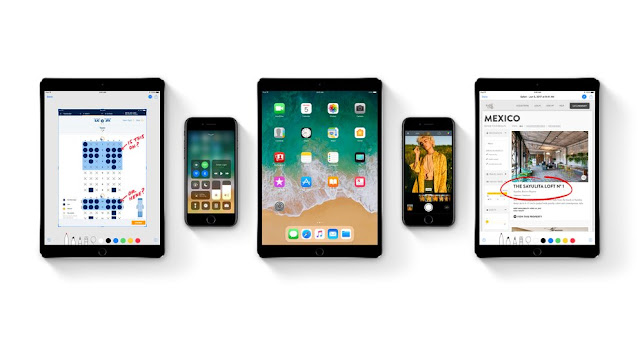
Make the kind of solve troubles coming from the new updates operating system iOS 11 in the iPhone and iPad

Make the kind of solve troubles coming from the new updates operating system iOS 11 in the iPhone and iPad
IOS 11 ipad and iphone


Make the kind of solve troubles coming from the new updates operating system iOS 11 in the iPhone and iPad: 

After updating Apple's new operating system iOS 11, many users are facing problems. If someone's phone has started hanging up, then someone is facing the trouble of getting a battery out early. That is why we have brought some tips for you to get rid of such problems.
If you have updated the phone and you are facing problems then you can get rid of the following. This is the way to reinstall recovery mode and iOS 11 again.

First you have to sign out of iCloud. For this go to settings and tap on your name. Now scroll down and sign out. For this, the iPhone will ask for your Apple ID and password. Then tap on Turn Off.
After this attach your device to the computer. After that launch iTunes.
Now press the phone's sleep / wake button and home button simultaneously. Press it until the recovery mode screen is found.
Follow the iTunes connection now and tap Restore.
Follow the restoration process. This will install a new copy of iOS.
After this, either you set up everything in the phone or backup it back.
However, Apple has removed the app re installation via iTunes. In such a situation, this can be a long process.

Many times Apple users have to face the trouble of phone hanging. To prevent this, users reboot or restart the phone. Many users are also required to restart the phone even after a new update. However, in the past few years, Apple has made several changes in their entire system, which can fix the problem. But sometimes the phone is rebooted or restarted very much. Go to Settings to restart the phone in iOS 11. After that go to General and tap on Shut Down given below. Then slide the right site on Slide to power off.
Go to phone settings. Then tap on General. Scroll down here, you will get the option of Reset All Settings. Tap on it and confirm by entering a passcode.